> ## Documentation Index
> Fetch the complete documentation index at: https://docs.vectoraidb.actian.com/llms.txt
> Use this file to discover all available pages before exploring further.
# Indexing overview
> HNSW and flat index types in VectorAI DB, including tunable parameters and tradeoffs between speed, accuracy, and memory.
Vector indexing organizes vector embeddings to enable fast data retrieval at scale. VectorAI DB supports two index types: HNSW and flat.
## Index types
**HNSW** (Hierarchical Navigable Small World) is the default. VectorAI DB builds an HNSW index automatically when you create a collection and insert data. HNSW uses approximate nearest neighbor (ANN) search, which trades exact precision for speed and scales to large datasets.
**Flat** indexing performs exact brute-force search by comparing every vector to the query. It guarantees perfect recall but has linear time complexity, which becomes impractical as collection size grows. Use flat indexing for small collections where exact results are required.
 ## How HNSW works
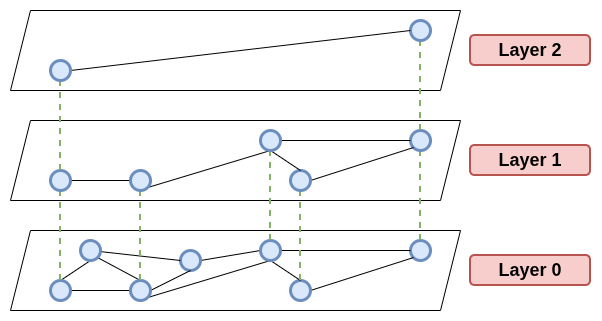
HNSW is a graph-based indexing algorithm designed to efficiently index vectors in high-dimensional space. The algorithm combines navigable small world graphs with a skip-list-style layered structure.
This combination creates a multilayer graph where each layer provides different levels of granularity for navigation. Upper layers enable long-range jumps across the graph for rapid exploration, while lower layers provide fine-grained connections for precise neighbor discovery.
## How HNSW works
HNSW is a graph-based indexing algorithm designed to efficiently index vectors in high-dimensional space. The algorithm combines navigable small world graphs with a skip-list-style layered structure.
This combination creates a multilayer graph where each layer provides different levels of granularity for navigation. Upper layers enable long-range jumps across the graph for rapid exploration, while lower layers provide fine-grained connections for precise neighbor discovery.
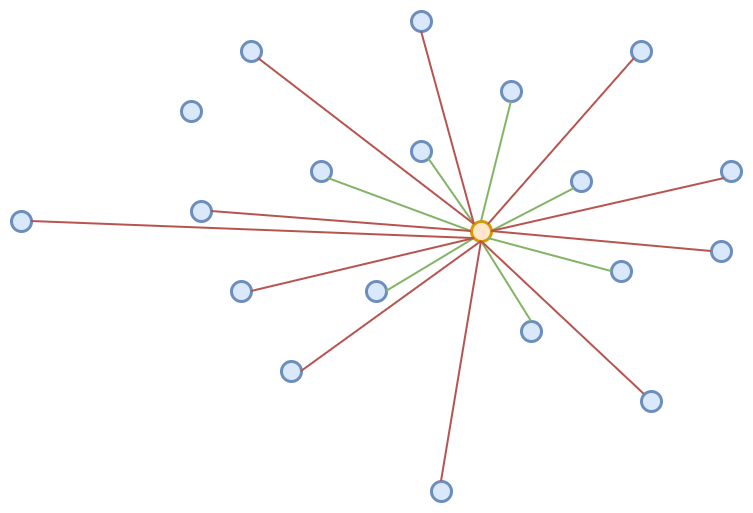
 The `hnsw_m` parameter controls the number of bidirectional links per node in the graph. VectorAI DB uses a default value of 16 for `hnsw_m`, which provides balanced performance for most applications.
The search process traverses the graph from top to bottom.
1. Start at the top layer and find the closest entry point.
2. Navigate through the graph by following edges to closer neighbors.
3. Descend to lower layers for increasingly precise results.
4. Continue until reaching the bottom layer.
5. Return the nearest neighbors found based on the number of results you requested.
This hierarchical approach enables fast query times on large datasets, with performance depending on the data distribution and parameter settings.
## HNSW parameters
VectorAI DB provides tunable parameters that control how the HNSW index behaves during both index construction and search operations.
### Index construction parameters
* **hnsw\_m** (default 16): Number of bidirectional links per node in the graph. Higher values improve recall by creating more connection paths but increase memory usage. Typical range: 8 to 64. In the Python SDK, this parameter is set as `m` inside `HnswConfigDiff`.
* **hnsw\_ef\_construct** (default 200): Number of neighbors considered during index building. Higher values improve index quality by exploring more candidates but slow construction. Typical range: 100 to 500. In the Python SDK, this parameter is set as `ef_construct` inside `HnswConfigDiff`.
### Search parameters
* **hnsw\_ef\_search** (default 50): Number of neighbors explored during search. Higher values improve recall by examining more candidates but increase search time. Typical range: 50 to 300.
## Parameter tradeoffs
Higher parameter values improve accuracy at the cost of increased memory usage, slower index construction, and longer search times. Lower values prioritize speed and memory efficiency but can reduce recall.
The defaults work for general-purpose vector search with moderate accuracy requirements. Test with your data to determine if custom parameters provide improvements.
## Task guides
See [Configure HNSW parameters](/docs/fundamentals/indexing/configure-hnsw-task) for step-by-step instructions on setting custom index parameters when creating a collection.
## Next steps
* [Collections](/docs/fundamentals/collections/collections) — Create collections with custom HNSW parameters.
* [Search operations](/docs/fundamentals/search/search) — Understand how indexing affects query performance.
* [Distance metrics](/docs/fundamentals/distance-metrics/distance-metrics) — Choose the right similarity measure.
* [Vectors](/docs/fundamentals/vectors/vectors) — Understand the embeddings being indexed.
The `hnsw_m` parameter controls the number of bidirectional links per node in the graph. VectorAI DB uses a default value of 16 for `hnsw_m`, which provides balanced performance for most applications.
The search process traverses the graph from top to bottom.
1. Start at the top layer and find the closest entry point.
2. Navigate through the graph by following edges to closer neighbors.
3. Descend to lower layers for increasingly precise results.
4. Continue until reaching the bottom layer.
5. Return the nearest neighbors found based on the number of results you requested.
This hierarchical approach enables fast query times on large datasets, with performance depending on the data distribution and parameter settings.
## HNSW parameters
VectorAI DB provides tunable parameters that control how the HNSW index behaves during both index construction and search operations.
### Index construction parameters
* **hnsw\_m** (default 16): Number of bidirectional links per node in the graph. Higher values improve recall by creating more connection paths but increase memory usage. Typical range: 8 to 64. In the Python SDK, this parameter is set as `m` inside `HnswConfigDiff`.
* **hnsw\_ef\_construct** (default 200): Number of neighbors considered during index building. Higher values improve index quality by exploring more candidates but slow construction. Typical range: 100 to 500. In the Python SDK, this parameter is set as `ef_construct` inside `HnswConfigDiff`.
### Search parameters
* **hnsw\_ef\_search** (default 50): Number of neighbors explored during search. Higher values improve recall by examining more candidates but increase search time. Typical range: 50 to 300.
## Parameter tradeoffs
Higher parameter values improve accuracy at the cost of increased memory usage, slower index construction, and longer search times. Lower values prioritize speed and memory efficiency but can reduce recall.
The defaults work for general-purpose vector search with moderate accuracy requirements. Test with your data to determine if custom parameters provide improvements.
## Task guides
See [Configure HNSW parameters](/docs/fundamentals/indexing/configure-hnsw-task) for step-by-step instructions on setting custom index parameters when creating a collection.
## Next steps
* [Collections](/docs/fundamentals/collections/collections) — Create collections with custom HNSW parameters.
* [Search operations](/docs/fundamentals/search/search) — Understand how indexing affects query performance.
* [Distance metrics](/docs/fundamentals/distance-metrics/distance-metrics) — Choose the right similarity measure.
* [Vectors](/docs/fundamentals/vectors/vectors) — Understand the embeddings being indexed.